How to Create a Digital Catalog for WhatsApp (Without PDFs) – 2026 Guide
What Is a Digital Catalog?
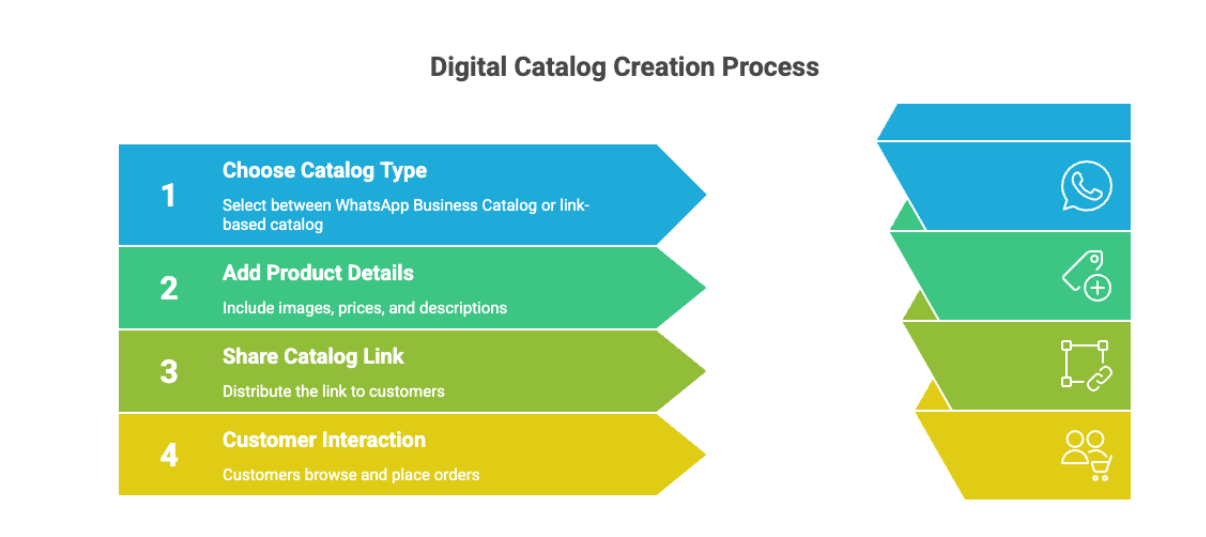
A digital catalog is a live, online product catalog that customers can browse using a link. It includes images, prices, descriptions, and ordering options — without requiring PDF downloads or a full ecommerce website.
Digital catalogs are searchable, mobile-friendly, and instantly updatable, making them ideal for WhatsApp and social media selling in India.
How Digital Catalogs Are Different from PDF or Printed Catalogs
Most sellers still believe a “digital catalog” means a PDF price list. In reality, PDFs are one of the biggest reasons WhatsApp sales fail in 2026.
Here’s why:
- Customers hate downloading large files
- PDFs don’t open properly on many phones
- Prices go outdated the moment you send them
- You never know who actually viewed the PDF
That’s why modern WhatsApp selling has shifted from files → links.
A digital catalog today means a live, clickable catalog link — not a document. If you want the full picture of what a digital catalog is and how it works, that context helps before choosing your setup method.
Two Ways to Create a WhatsApp Digital Catalog (No PDFs)
There are only two real methods sellers use in 2026:
- The Native Way – Using WhatsApp Business itself
- The Pro Way – Using a dedicated digital catalog tool
Let’s break both down honestly.
Method 1: Create a Catalog Using WhatsApp Business App (Free)
Best for:
Small sellers with fewer than 30–50 products and no need for analytics or bulk management.
Step-by-Step Setup
- Open WhatsApp Business
- Go to Settings → Business Tools → Catalog
- Tap Add New Item
- Upload:
- Product photos (up to 10)
- Name
- Price (₹)
- Description
- Tap Save
- Wait for Meta’s review (minutes to hours)
- Share the catalog link or individual products in chat
Once approved, customers can browse products directly inside WhatsApp.
Hidden Downsides of WhatsApp’s Native Catalog
This is also where why Indian sellers lose WhatsApp orders connects directly the friction starts at the catalog setup itself, not just in the chat.
- Approval delays: Branded or sensitive items often get rejected
- Manual work: Products must be added one-by-one on a phone
- No analytics: You don’t know who viewed your catalog
- Limited branding: It looks like WhatsApp, not your store
- Scaling pain: Managing 100+ products becomes exhausting
This is why most serious sellers eventually look for an alternative.
Method 2: Create a Digital Catalog Using a Catalog Maker (Scalable)
Best for:
Wholesalers, resellers, boutiques, and sellers with 50+ products.
Instead of building a website, these tools generate a live catalog link that opens instantly on any phone.
How This Method Works
- Sign up using your phone number
- Upload products (manually or via Excel)
- Organize items into categories
- Get a single catalog link (e.g., yourstore.link)
- Share the link on WhatsApp, Instagram, Status, or broadcasts
Some Indian sellers use tools like SellEzzy here—not to replace WhatsApp, but to make WhatsApp selling cleaner and faster.
Why Digital Catalogs Are Growing in India (2026 Context)
- No PDF downloads
- Instant price updates
- Search & filters for customers
- Out-of-stock control
- Full analytics visibility (views, interest, orders)
- Lower risk of WhatsApp spam flags (one link vs 50 photos)
The catalog behaves like a lightweight store, without website complexity.
PDF vs WhatsApp Catalog vs Digital Catalog Link
How to Share Your Digital Catalog for More Sales
Distribution matters. Creating a catalog is only half the job the other half is making sure customers actually reach it. That's the whole idea behind how to sell on WhatsApp without PDFs: less friction at every step, from browsing to ordering.
1. Auto-Reply Strategy (Most Effective)
Set a WhatsApp Business greeting message:
“Thanks for messaging! View our full price list and latest products here: [Catalog Link]”
Every lead sees your catalog instantlyno delay.
2. WhatsApp Status Strategy
Post one hero product photo
Caption:
“Tap the link to see 50 more designs → [Link]”
This drives silent browsing without chat overload.
3. Bio & About Section
Add the catalog link to:
- WhatsApp Business “About”
- Instagram bio
- Google Business Profile
This turns your link into a permanent storefront.
Which Method Should You Choose?
- Use WhatsApp’s native catalog if:
- You have very few products
- You don’t need analytics
- You’re just starting out
- Use a digital catalog link if:
- You sell regularly on WhatsApp
- You update prices or stock often
- You want to look professional without building a website
- You want visibility into customer behavior
If you're evaluating which platform to use, the best digital catalog software in India comparison breaks down exactly what fits which selling model.
Many Indian sellers start with WhatsApp's catalog and later shift to a tool like SellEzzy when volume, complexity, or missed orders increase. For a full breakdown of how the native catalog works, the WhatsApp catalog guide for Indian sellers covers what to expect before you outgrow it.
Final Takeaway (2026 Reality)
Selling on WhatsApp no longer means:
- Sending PDFs
- Spamming photos
- Answering “price?” 50 times a day
It means:
- One clean catalog link
- Customers browsing on their own
- Fewer chats, more confirmed orders
PDFs were built for printing.
Digital catalogs are built for how people actually buy today.
Frequently Asked Questions About Digital Catalogs
1. What is the meaning of a digital catalog?
A digital catalog is an online version of a product catalog that allows customers to browse products using a link instead of downloading a PDF or viewing a printed brochure.
2. Is a digital catalog the same as a website?
No. A digital catalog is simpler than a full ecommerce website. It focuses on product browsing and sharing, often connecting directly to WhatsApp for orders.
3. How is a digital catalog different from a PDF catalog?
A digital catalog is searchable, instantly updatable, and mobile-friendly. A PDF is static, requires downloading, and cannot be updated after sending.
4. Can small businesses in India use digital catalogs?
Yes. Many Indian boutiques, wholesalers, and Instagram sellers use digital catalogs to sell on WhatsApp and social media without building a full website.
5. Do digital catalogs support analytics?
Yes. Unlike PDFs, digital catalogs can track views, clicks, and product interest, helping sellers understand buyer behavior.
6. Are digital catalogs good for WhatsApp selling?
Yes. Digital catalogs are ideal for WhatsApp selling because they reduce friction, show prices clearly, and allow customers to browse without downloading files.