What Is a Digital Catalog? Meaning, Examples & Use Cases (2026 Guide)
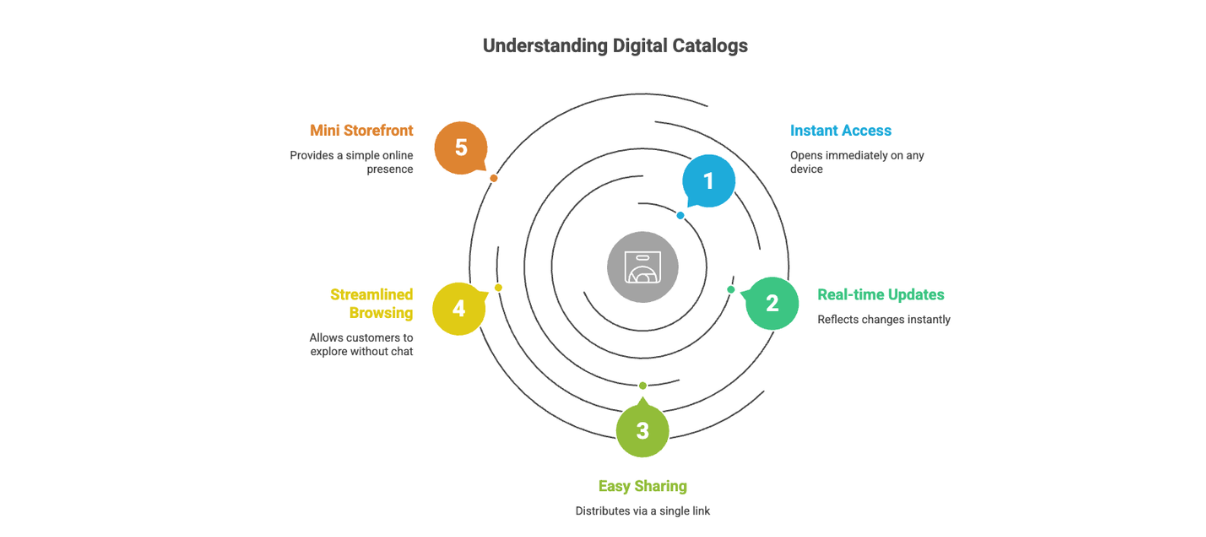
What Is a Digital Catalog? (Short Definition)
A digital catalog is a live, online product catalog that customers can browse using a link. It includes images, prices, descriptions, and ordering options — without requiring PDF downloads or a full ecommerce website.
Digital catalogs are searchable, mobile-friendly, and instantly updatable, making them ideal for WhatsApp and social media selling in India.
How Digital Catalogs Are Different from PDF or Printed Catalogs
Most businesses historically relied on:
- Printed catalogs (expensive, outdated quickly)
- PDF catalogs (heavy files, poor mobile experience)
In 2026, both are increasingly replaced by digital catalogs because PDFs:
- Need to be downloaded
- Are hard to search on a phone
- Become outdated the moment prices or stock change
- Give sellers zero visibility into whether customers even opened them
A digital catalog solves these problems by staying live and accessible at all times.
Key Features of a Modern Digital Catalog
A modern digital catalog typically has these features:
1. Always Updated (Live Content)
Prices, stock availability, or product details can be changed instantly. There’s no need to resend files or worry about customers seeing old information.
2. Searchable & Organized
Customers can search by product name, category, or keyword instead of scrolling through dozens of pages or images.
3. Mobile-First Experience
Designed for phones first—which matters in India, where most buyers discover products via WhatsApp or Instagram.
4. Shareable by Link
A single link can be shared on WhatsApp, Instagram bio, Google Business Profile, or even SMS.
5. Measurable (Analytics)
Unlike PDFs, digital catalogs can show:
- Who opened the catalog
- Which products were viewed
- Where customers dropped off This visibility is becoming essential for small businesses.
Types of Digital Catalogs (With Examples)
1. WhatsApp Business Catalog
Used widely by Indian sellers, this is WhatsApp's built-in catalog feature. But there's a lot more to understand about what works and what breaks with WhatsApp catalogs before relying on it as your main selling system."
How it works:
- Products are added inside WhatsApp Business
- Customers browse items within WhatsApp itself
- Orders are confirmed via chat
Best for: Very small sellers with limited products
Limitations: Branding control, analytics, scalability, approval delays
2. Web-Based Digital Catalogs (Link-Based)
These are lightweight, web-hosted catalogs that open in a browser when a customer clicks a link.
Typical use cases:
- Sellers sharing a catalog link on WhatsApp instead of sending photos
- Instagram sellers using one link in bio for their entire collection
- Wholesalers sending “New Arrivals” links to buyers
Some Indian sellers use tools like SellEzzy in this category — not as a full website, but as a live catalog link that connects directly to WhatsApp orders. If you want a step-by-step breakdown, how to create a digital catalog link for WhatsApp covers both the free and paid methods.
3. Flipbook-Style Catalogs (PDF → Interactive)
These convert PDFs into interactive page-flip experiences with links and videos.
Best for: Lookbooks, brochures, exports
Not ideal for: WhatsApp-first selling or frequent price changes
4. Enterprise / B2B Catalog Systems
Used by large distributors or manufacturers to manage thousands of SKUs with real-time pricing.
Best for: B2B sales teams, ERP-integrated businesses
Overkill for: Small Indian shops and home businesses
Why Digital Catalogs Are Growing in India (2026 Context)
Digital catalogs have grown rapidly in India because of three realities:
Before choosing a platform, it also helps to understand the cost of digital catalog software in India because pricing varies wildly depending on what you actually need.
- WhatsApp Is the Default Commerce Channel Most Tier-2/3 buyers prefer chatting before buying.
- Customers Avoid Downloads Low storage, slow data, and privacy concerns make PDFs unpopular.
- Prices Change Frequently Gold, fabric, food, and seasonal products need live pricing.
A digital catalog fits naturally into this ecosystem—it works with how Indian customers already buy.
Use Cases for Small Businesses & WhatsApp Sellers
1. WhatsApp Selling (Without PDFs)
Instead of sending:
- 20 product photos
- A 30-page PDF
Sellers share one catalog link where customers browse quietly and place orders when ready.
2. Social Commerce (Instagram + WhatsApp)
A digital catalog link:
- Goes in Instagram bio
- Is shared in Stories or DMs
- Opens instantly without login
This removes friction between discovery and purchase.
3. Wholesale & Reseller Businesses
Wholesalers often manage:
- Hundreds of products
- Multiple buyers
- Frequent updates
A searchable digital catalog avoids confusion, reduces errors, and saves hours of manual explanation.
4. Seasonal or Flash Sales
During festivals or clearance sales:
- Stock moves fast
- PDFs become outdated within hours
Live catalogs allow sellers to hide sold-out items instantly and avoid customer frustration.
Digital Catalog vs PDF Catalog
Where Tools Like SellEzzy Fit
For sellers who:
- Don’t want a full website
- Sell primarily on WhatsApp or social media
- Need live updates and analytics
A lightweight digital catalog platform makes sense as a middle path—more powerful than PDFs, simpler than Shopify-style stores.
The key idea is not “building a website,” but sharing a live catalog link that works wherever customers already are.
Final Takeaway (2026 Perspective)
Digital catalogs are no longer optional they’re becoming the default way products are shared and sold, especially in mobile-first markets like India.
If PDFs represent the past and full e-commerce websites represent complexity, digital catalogs sit in the middle:
- Simple to use
- Easy for customers
- Flexible for sellers
If you're wondering whether you need a catalog or a full store, the digital catalog vs ecommerce website breakdown will help you decide what actually makes sense at your stage.
In 2026, the businesses that win aren’t the ones sending more messages—but the ones sending clear, clickable product experiences.
Frequently Asked Questions About Digital Catalogs
1. What is the meaning of a digital catalog?
A digital catalog is an online version of a product catalog
that allows customers to browse products using a link instead of downloading a PDF or viewing a printed brochure.
2. Is a digital catalog the same as a website?
No. A digital catalog is simpler than a full ecommerce website. It focuses on product browsing and sharing, often connecting directly to WhatsApp for orders.
3. How is a digital catalog different from a PDF catalog?
A digital catalog is searchable, instantly updatable, and mobile-friendly. A PDF is static, requires downloading, and cannot be updated after sending.
4. Can small businesses in India use digital catalogs?
Yes. Many Indian boutiques, wholesalers, and Instagram sellers use digital catalogs to sell on WhatsApp and social media without building a full website.
5. Do digital catalogs support analytics?
Yes. Unlike PDFs, digital catalogs can track views, clicks, and product interest, helping sellers understand buyer behavior.
6. Are digital catalogs good for WhatsApp selling?
Yes. Digital catalogs are ideal for WhatsApp selling because they reduce friction, show prices clearly, and allow customers to browse without downloading files.